FAQ
Answers about Jelly Digital.
Everything about our home and business internet service — coverage, plans, technology, install, billing — in one place. If your question isn't here, it's usually fastest to call us at +1 619-304-7112.
General
What is Jelly Digital?
A locally-owned internet service provider based in San Diego. We serve homes with internet, and businesses with fiber plus enterprise-grade internet. Our office is in Chula Vista and the team lives in San Diego — support calls don't route to an overseas call center.
Where does Jelly Digital serve?
Across San Diego — from downtown south to the US/Mexico border and east across the county, including rural East County communities where AT&T and Cox service is limited or absent. Our coverage map and detailed city pages live at /coverage/.
How is Jelly different from AT&T or Cox?
Three things, honestly. First, we serve rural and underserved addresses those carriers skipped — internet reaches where cable wasn't run and DSL is slow. Second, we're local: our techs live here, we answer our own phones, and we make service decisions in San Diego. Third, we don't use contracts or data caps on our residential plans.
Do you have a Spanish-speaking team?
Yes. Bilingual support is important for where we operate — our San Diego-based team handles Spanish and English directly, without a language routing maze.
What makes Jelly Digital better?
Jelly Digital provides fast, reliable internet services at a fair price. We do not tack on hidden charges and our support is fast and courteous. Unlike the big-box providers of internet, we're able to out-pace their technology which requires lots of wires in the ground, this makes us good for the environment too. Our focus is to stick to what we do best and that is providing the best internet experience to our customers.
Are you a reseller?
NO, we own and operate our own network. This includes the fiber and all data centers that control your quality of service and internet speed.
Do you filter content?
No. We do not filter content. We provide a neutral internet service to our customers so that they can make their own choices. If you wish to filter content locally at your home, we recommend purchasing a wifi router with content filtering options. There is also software for Windows, Mac and Mobile Devices that may be installed at your option.
This service is great and unique, do you offer customer rewards for referrals?
If you are an existing Jelly Digital Internet customer and refer our service to your friends and family, you can earn service credits for each customer who has an install completed and has paid their first months fees. If you would like to turn this into a career opportunity, please email us at hello@jellydigital.net
Residential internet
What plans do you offer for home internet?
Three internet plans: $69/month (50–100 Mbps down), $79/month (90–200 Mbps down), and $89/month (90–300 Mbps down with network prioritization). All include unlimited data and no contract. See /residential/ for the full comparison.
Are there data caps, overage fees, or throttling?
No, no, and no. Every residential plan includes unlimited data, and we don't throttle after a threshold. Our $89 plan additionally gets prioritization when the network is busy, which helps during evening peak.
Do I have to sign a contract?
No. All residential plans are month-to-month with no early termination fees. Cancel whenever — we'll pick up the equipment.
What's the 4-year prepay offer?
If you pay four years up front (about $1,750 total), your effective rate drops to $36.45/month — roughly a third of our standard pricing. It's our lowest rate and works well for households that plan to stay put. Ask about it on the contact form.
Can I use my own router?
Yes. The antenna we install hands off to an Ethernet cable — plug any router you own into it. We can also supply and configure a router if you'd rather not deal with it.
I would like to make sure wifi is in all of my rooms.
We provide the basic connection and wifi device. If you have a large home or office and would like to extend the wifi coverage, please select from our various router upgrades. Large homes should have a mesh-wifi system installed to assure optimal coverage.
I have a new router, what should I do to set it up?
If you have received a new router from Jelly Digital or have purchased your own and need help setting it up, please text us at our main number or use the contact us forms on our website. Most routers are plug and play and easy to setup. We recommend just following the instructions that came with it. Be sure to set the router to 'DHCP' or 'Automatically configure IP Address'. If asked you should set your primary DNS server to: 8.8.8.8 and the Secondary to 8.8.4.4. Also, please make sure to select router mode, not access point or 'bridge mode'. Bridge mode and Access Point mode can get your connection blocked for security reasons which require you to call us to fix.
Can I freeze my account?
Monthly subscribers may freeze their accounts if their payment balance is current. We have a monthly fee of $10.00 per month for frozen accounts. We limit the speed to 2Mbps. This is good for those who wish to keep our service active and available but not cancel. Lifeline service is good for a backup to another provider. We can re-enable full capacity same-day should you wish to lift the limits and subscribe to a regular plan.
Business internet
What business products do you offer?
Two: dedicated fiber connections where the infrastructure reaches, and enterprise-grade internet on licensed spectrum for locations fiber can't serve. Both come with symmetric speeds, static IP, and SLA-backed uptime. Pricing is quote-based — send your address and requirements via /contact/.
Do you provide static IPv4 and IPv6?
Yes. All business plans include static IPv4. IPv6 is available on request on both fiber and internet circuits.
What's the SLA?
Business plans carry uptime, latency, and response-time commitments with credits when we miss. Exact numbers depend on circuit type (fiber vs internet) — we put them in writing with the quote.
Can you do multi-site businesses?
Yes. We can consistently provision circuits across multiple San Diego locations — coordinated installation, one point of contact, one billing relationship. If you also want a secondary path for redundancy, we can pair fiber primary with internet backup on separate physical paths.
How fast can you install a business circuit?
Internet: typically 1–2 weeks from contract to live, assuming line-of-sight to a tower (which covers most of our service area). Fiber to a commercial address: 3–8 weeks depending on whether we're extending existing fiber or trenching new lateral. We scope it up front at no cost.
Roof Mounts for Business Locations
You can find a document on how we deploy our service on the roof of a business location here. The link below is helpful if you need to provide this information to your property manager or landlord. Download Roof Mount Guide (PDF)
Technology
What is internet, and how is it different from 5G home internet?
Internet uses a small directional antenna mounted on your roof with line-of-sight to our tower, running on dedicated licensed spectrum. It doesn't share capacity with cellular traffic. 5G home internet from AT&T, T-Mobile, and Verizon uses the same congested cellular network as mobile phones — speeds drop when the neighborhood gets busy, and rural line-of-sight to towers is often weaker.
How are you going to connect your fast internet to my home or business?
Because we like all things FAST, we have engineered our fiber optic network to use the latest in advanced internet technology. By placing a tiny device on your roof, which connects to our fast fiber network, we enable your location to receive our incredibly fast and reliable service. This is NOT satellite or cellular service. While cellular LTE and 5G may be good for cell phones, it's not even close to what were able to provide using our internet wave technology. It's so good in fact that the industry term for it is 'Air Fiber'. In simple terms, we place our device on your roof, aim it to our tower nearby and create a direct point to point connection between your location and our fiber optic network powering the tower.
Fiber, internet, or cable — which is actually better?
Depends on the address. Fiber is the gold standard where it reaches: symmetric, low latency, essentially unlimited capacity. Cable (Cox) works well in dense neighborhoods but upload speeds lag badly. Internet fills the gap for rural addresses fiber and cable skipped, and for business locations where a symmetric, dedicated connection matters more than raw top speed. We pick the right tech for your address.
How does internet compare to Satellite, DSL, Cable and Fiber-Optics?
Satellite – Most satellites are floating in orbit between 100 and 24,000 miles away. That's how far your data is traveling – so latency (the delay between the signal being sent and reaching its destination) is going to be much higher than just about any other option. By comparison, your nearest Jelly Digital tower will typically be less than 5 miles from your house. Jelly Digital latency times (i.e. 30ms) are a fraction of that of satellite (i.e. 400ms). Customers who switch from Satellite to Jelly Digital are often amazed by the improvement in Internet speed and reliability. Unlike Satellite, the weather does not affect Jelly Digital service.
DSL – Only available in towns, or within a certain distance to the DSL Central Office. Usually requires a phone line, so bundling with a phone is usually required. Most DSL speeds are between 1 and 3 Mbps. Beware – the older the phone lines in your town or neighborhood, the slower and less reliable your DSL Internet connection can be. If you are looking to cancel your landline telephone and get the Internet only, or you want more speed than DSL can provide, Jelly Digital could be your solution.
Cable – It can be very fast. Cable providers rank highest on lists of companies with the worst customer service. Jelly Digital's speeds are comparable to cable, and customers enjoy local, friendly, and knowledgeable support.
Fiber – It can be the fastest – but it's not always. Providers can vary a lot – from the speeds they offer and how much they charge, to how long it takes to repair a cut fiber line and restore an outage.
Will weather affect my internet connection?
Rarely, and not in ways that matter over a year of service. Heavy rain can briefly nudge throughput on certain frequencies; wind doesn't affect the installations because the antennas are small and rigid. Practical uptime on internet matches or exceeds cable in most of our service footprint.
Weather has no affect on our fiber network. Your wave-link connection is provisioned using millimeter-wave and/or microwave bands that may be slightly affected by rain. Because of our over-engineering, the affect of rain-fade will not have an impact on the service level we provide to you. Plus, wind and other elements of weather do not affect the signals. Oh, and you live in San Diego.
Do I need line-of-sight to a tower?
For internet, yes — the antenna needs an unobstructed line to one of our towers. Most of our service area has clean line-of-sight. In hilly terrain, a free site survey confirms whether your specific address works; sometimes a taller mast gets clearance. If line-of-sight isn't possible, we'll tell you up front rather than sell you a connection that won't perform.
What type of cable do you use? Cat5e or Cat6?
We use Cat5e cable rated for outdoor with UV protection. The speed of Cat5e cabling supports high-performance networking. Category 5 enhanced cables can deliver Gigabit Ethernet speeds of up to 1000 Mbps at up to 328 feet in length. Devices connected by the cable, including switches and routers, also support the desired data speeds. Many people are told that they need Cat6 cable to enable better gaming and overall performance however this is not the case.
Installation
How long does residential installation take?
Typically 5–10 business days from order to live connection. Rural East County installs occasionally take longer if line-of-sight needs verification or a taller mount is required.
What does installation involve?
A Jelly tech visits, mounts a small directional antenna on your roof (or an exterior wall facing our tower), runs an Ethernet cable into your home, and connects it to your router. Install is included on every plan.
Is there any equipment to buy?
No. The antenna and mounting are ours — we install, maintain, and eventually remove it if you cancel. You supply a router or let us provide one.
Do I need to be home for install?
Yes, for residential. An adult authorized to approve the mounting location needs to be on site during install (typically a 1–2 hour window). For business installs, your facility contact or IT coordinator works.
What does the install consist of?
Our installer will arrive and access your roof. We will place a small device on your roof that is smaller than your typical satellite television dish. The device looks high tech and certainly better than those satellite dishes. It is not an eyesore. Our installer will run an ethernet cable into your home or business to connect a router and small power adaptor.
Won't my HOA (Homeowners Association) prevent me from having a device on my roof?
No. Nope. Nah. Won't happen. Promise! In all seriousness though, they can't prevent us from installing our communications equipment on your roof. There are laws created by the FCC specifically preventing them from interfering. Read the FCC OTARD Rule
I have solar panels, is this a problem?
Not at all. Just remember to compliment the installers new tan when he is done with the install. Our technicians have the proper experience and training to deal with anything they come across at your home.
Whats the deal with wiring inside my home?
Our normal installation consists of an ethernet cable from our roof-mounted equipment to the wall of the room you want your router in. If there are more extensive wiring needs, please discuss with your Jelly representative. Costs for additional wiring start at $100.00 and go from there depending on the details of your project.
I am having roof work done, what do I need to do?
If you have a new roof being installed, please contact us for proper guidance. We will work with you to accomodate this work. (A fee may apply which will be determined based on the work being done and what we need to do. Typically $125.00 if the work can be completed in a one hours time)
Installation Waiver and indemnification
By ordering our internet service, you hereby acknowledge and agree that you are either the homeowner or a duly authorized legal representative of the homeowner, and that you have obtained explicit permission from the legal homeowner for the roof-mounted installation of our dish.
Furthermore, you shall indemnify and hold Jelly Digital harmless from any liability or claims arising from:
• Mounted equipment
• Holes drilled
• Wind or rain damage
• Any other natural aging or wear of sealants and flashings resulting from the installation
In the event of any damage or loss, the maximum liability shall not exceed the cost of a typical installation, which is set at $150.00 USD.
You furthermore agree to all terms listed on our FAQ page. We offer a 30 day Money Back Guarantee from the day of install. Please remember to store your card information as we require all customers to be on auto-pay.
Billing & Policies
How do I pay?
Monthly auto-pay via credit card or ACH is standard. Business customers can request net-30 invoicing. The 4-year residential prepay is a single up-front payment.
Is there an activation fee?
No. Professional installation is included on every residential plan. Business install fees depend on circuit type — fiber builds can include one-time construction costs, disclosed up front in the quote.
What happens if I cancel?
Residential cancels are month-to-month with no fee. We schedule a short equipment pickup and you're done. Business cancellations follow the terms in your signed agreement, which we write to be fair — we'd rather not keep a customer who wants to leave.
Refund and Cancellation Policy
30-Day Money Back Guarantee
Every new installation comes with a 30-day money-back guarantee, which begins on the day of the service installation. If you're not satisfied with our service within this time frame, you may request a full refund of the amount paid for the initial installation and service. However, any such refund will not be processed until we have successfully retrieved the equipment that was installed at the customer's premises.
Exclusions
We do not offer credits for outages, downtime, or disruptions arising due to:
• Mistakes made by the customer
• Network issues outside of our control
• Events like natural disasters, power outages, or any unforeseen circumstances
Cancellation Policy
Should a customer decide to terminate their service, we require a 30-day written notice in advance, which must be sent via email to hello@jellydigital.net. We do not accept cancellations by text, web-chat, or voice messages.
Upon receiving a valid cancellation request, customers will be charged for their final billing month plus a $75.00 equipment recovery fee.
Commercial Accounts
The policies mentioned here do not apply to our commercial customers who have signed service contracts.
My card has expired or How do I update my payment method?
To update your payment method, please send a text to +1 (619) 304-7112 or email hello@jellydigital.net. Let us know you wish to change your payment card details and we will send a link to you to update it.
How do you bill me?
At the time of order, you pay only the installation costs up front. Your monthly fee will be billed to the same card you used when you placed your order, on the day you are first installed.
This will become your monthly billing date and your card will be automatically billed each month on or around this day. We do this because we cannot bill your first months fee until your service is alive and activated.
All service must be auto-pay, we do not offer invoiced services for customers. Customers must have an active card on file to cover the automatic billing. Business Corporate/Enterprise customers may have invoiced services as stated in their signed contract.
What is your acceptable usage policy and/or privacy policy?
You can read the full AUP policy at jellydigital.net/aup.
While our Internet plans allow you to download an unlimited amount of data, there are laws against downloading certain things, including copyright-infringed works. When we get a DMCA complaint linked to your account, we are required by law to notify you. The first 2 'strikes' are free, and then it's $30 per DMCA complaint up to 12, which is when we have to ask you to find another ISP.
We take your privacy seriously, please see our privacy policy here: jellydigital.net/privacypolicy
BitTorrent and p2p File Sharing
Sharing copyrighted material is against our acceptable usage policy and may lead to immediate account termination as well as legal liability.
Navigating the Complexity of Peer-to-Peer Networking
In the intricate digital world, Peer-to-Peer (P2P) networks signify interconnected computer systems, enabling them to converse and distribute files amongst themselves, bypassing the need for a central server's authority. The architecture establishes an essentially egalitarian platform where each participant, or peer, holds equal status. Diverse forms and functionalities characterize P2P networks, offering a range of uses.
However, while P2P networks bring forth numerous advantages, users must tread cautiously regarding security dilemmas and the perils involved in disseminating copyrighted content. Adequate knowledge should be absorbed before diving into P2P usage, and youngsters ought to gain approval from a parent or guardian before initiating file exchanges.
Navigating Copyright Waters
A prevalent activity on certain P2P platforms involves distributing music, movies, software, and other copyrighted items. Engaging in such sharing without the explicit consent of the copyright proprietor, outside of legitimate fair use, constitutes an illegal act, potentially incurring grave liabilities.
Various copyright-holder collectives, such as the Motion Picture Association of America (MPAA) and the Recording Industry Association of America (RIAA), have undertaken legal battles against several P2P network providers. A noteworthy example includes a U.S. Supreme Court case, which determined that P2P networks like Grokster could face legal repercussions for facilitating copyright violations by its users.
Both RIAA and MPAA have initiated lawsuits against numerous P2P users who have uploaded copyrighted files for P2P distribution. These entities scrutinize P2P networks for their owned works, identify and document the IP addresses engaged in sharing or downloading, and leverage this information to trace the individual via their Internet Service Provider (ISP). Once legal proceedings commence, they seek ISP records through subpoenas to identify the user linked to the IP address.
While some ISPs have challenged the legality of the tactics utilized in these instances, RIAA and MPAA have managed to coerce some providers into revealing the identities and locales of P2P users purportedly disseminating copyrighted materials. Employing this data, the entities have sought potentially hefty infringement penalties, with some P2P users being subjected to substantial financial damages.
For a more profound understanding of copyright holders' stance, visit the United States Copyright Office website.
Two organizations vocally opposing these lawsuits:
• Electronic Frontier Foundation
• Electronic Privacy Information Center
Tackling Illegal Content and Security Issues
P2P networks facilitate the sharing of various file types, and unfortunately, some users have disseminated or accessed illegal content, such as child pornography. It's vital to understand that P2P interactions don't offer absolute anonymity and engaging in illicit file sharing can unleash serious repercussions.
Moreover, security risks stemming from viruses and spyware are prevalent in P2P network use. Numerous P2P software applications may involuntarily incorporate detrimental features, including malware types like spyware or adware, and files obtainable through P2P networks might be intentionally infused with viruses.
The threat of spyware—software that transmits user data without their consent—and potential resultant issues like unauthorized file copying, browser hijacking, and system performance degradation, is particularly noteworthy in the context of P2P networks. Anti-spyware tools may not always effectively expunge spyware from P2P software.
Additional concerns involve computer viruses and Trojan horse programs via P2P software, leading to similar problems as spyware and potentially enabling remote utilization of a user's computer for spam email distribution. Employing a firewall and ongoing anti-virus protection is imperative for computers operating P2P software.
Support & Troubleshooting
How do I get support for my service?
There are several ways you can contact us. All contact methods go into the same support system.
We highly recommend sending us a text message to: +1 (619) 304-7112
By sending a text, we receive the message into our global support system and the correct staff will respond to your request.
Methods of support:
• Text/SMS: +1 (619) 304-7112 (Our recommended best method)
• Email: hello@jellydigital.net
• Website Chat: Located in the lower right hand corner of our web pages
• Telephone: +1 (619) 304-7112
How can I troubleshoot my connection?
Let's do some things together to get you back online.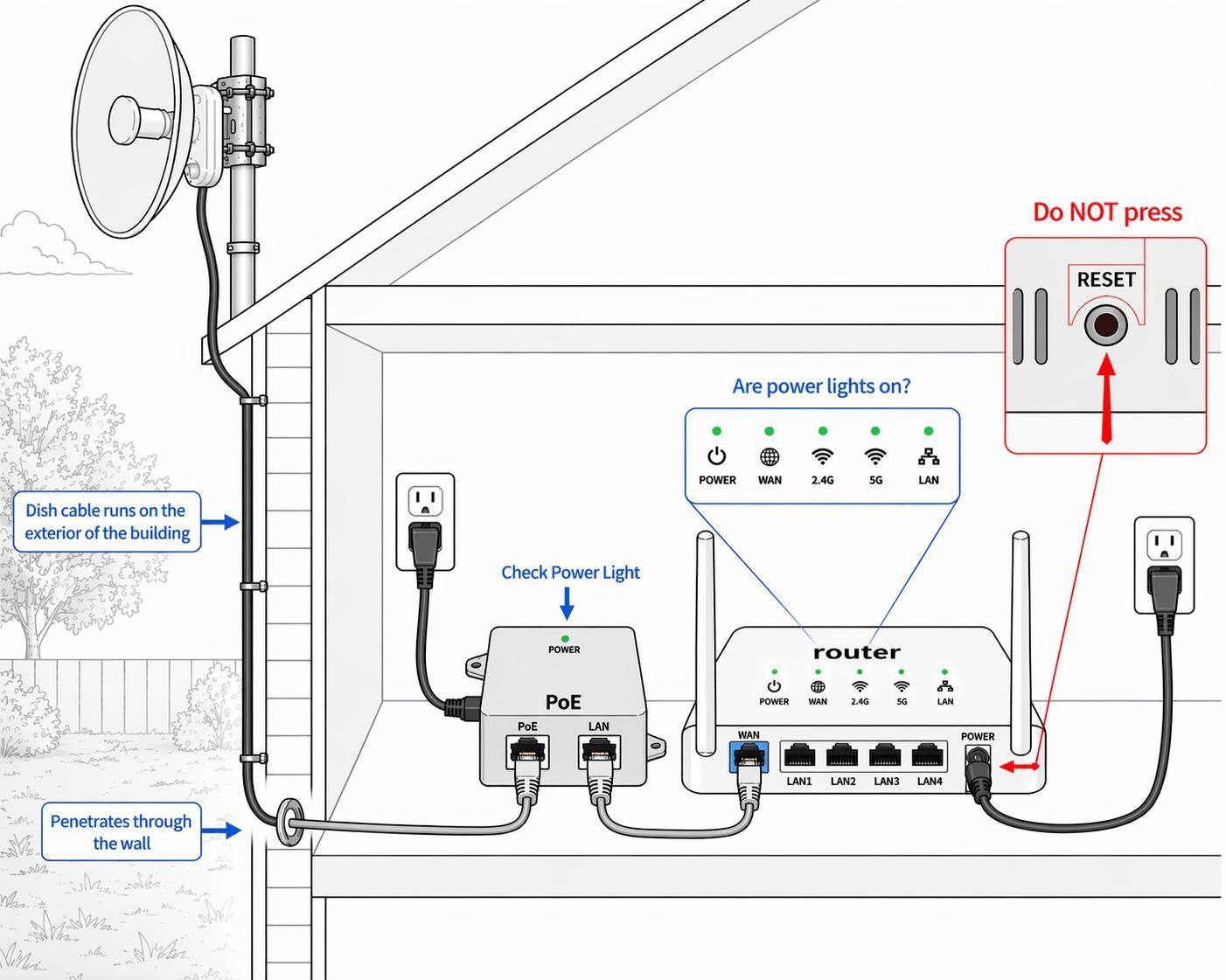
Step 1: Check the POE Device
Do you know what our POE device is? If not, it's the little power block that the cable which enters your home from outside plugs into. Please locate that power block. It has a light on it — is the light on?
If there is no light, please verify the wall outlet has power. Sometimes the outlet you are plugged into may be controlled by a light switch (or dimmer) that is in the off position. Try to move the POE power to an outlet that is not controlled by a power switch or dimmer.
Step 2: Check the Cables
Please verify that the cables were not switched at the POE Ethernet ports. The cable that enters your home from outside needs to be plugged into the port labeled POE or sometimes it says POE+Data. There is a second port that says only data or LAN. Please make sure the cables are plugged in correctly that way.
Step 3: Power Cycle
Please unplug power to the POE device from the wall outlet. Count to 20 and plug it back in.
After you plug it in, leave it sit for up to 15 minutes as it attempts to re-sync to the tower. You should reboot your wifi router as a precaution 5 full minutes after you plug the POE back in the wall power.
You should have internet after a few minutes.
Step 4: Check the Dish
If you still do not have internet, then please go outside your house and make sure the dish does not look as if it's facing down to the ground or up into space. It should be aimed toward the horizon.
Do not attempt to move or align the dish yourself as only a qualified technician can do this with the right testing gear. If your dish looks like it has fallen over please let us know so we can send our techs to repair this issue which is rare but does happen.
Watch this video to learn more:
Troubleshooting Video
I was told to power cycle my devices, what does this mean and how do I do it?
When having problems with your Internet connection, the best thing to do first is power cycle both your router and your Jelly Digital internet equipment.
To reset your Jelly Digital internet connection, try the following steps:
1. Locate your Internet Adapter (POE). For help on locating this, please view the helpful videos in our video collection.
2. Reboot your outside radio by unplugging this adapter from AC power. Wait 60 seconds then put the power plug back in.
3. If you have a wi-fi router, unplug it from the power for 60 seconds.
4. After 10 minutes, check your computer for Internet.
Please do not repeatedly unplug and plug in the POE adaptor as it can take upwards of 30 minutes for your equipment to reconnect in some conditions.
If none of these steps resolve your issue please contact us by sending a text message to +1 (619) 304-7112 or using our other contact methods.
What happens if something goes wrong?
After installation, we won't leave you on your own. Even though internet should be relatively maintenance and up keep-free, sometimes things happen.
Rest assured you can call us with any of your issues, and you'll get a real person that will make things right.
We suggest sending a text message to our support system at +1 (619) 304-7112 or using our other contact methods located elsewhere in our site.
Will I get the speeds I am paying for?
We offer 'up-to' speeds. If you are paying for the 200Mbps package, you will get as close to 200Mbps as possible.
However, if you have Non-Line-of-Sight equipment because you have trees and obstructions between you and the tower, your speeds will be lower. Otherwise, if you have clear line-of-sight to the tower, you should get the maximum speed.
Note: When running a speed test, your results will be measured in Mbps. When downloading files, you will see your speed measured in bytes (MB/s), not bits (Mbps).
My speed tests do not look right, what may be the cause?
Here is a link to a good article by a third party on speed tests and the proper ways to use them:
Rules for a More Accurate Internet Speed Test
Still have a question?
We answer our own phone and reply to email quickly. For anything specific to your address — coverage, install timing, business requirements — the fastest path is to ask us directly.
Updated